What Is an e-Arşiv Invoice? e-Arşiv with Logo Edge N-Series (Logo Netsis)
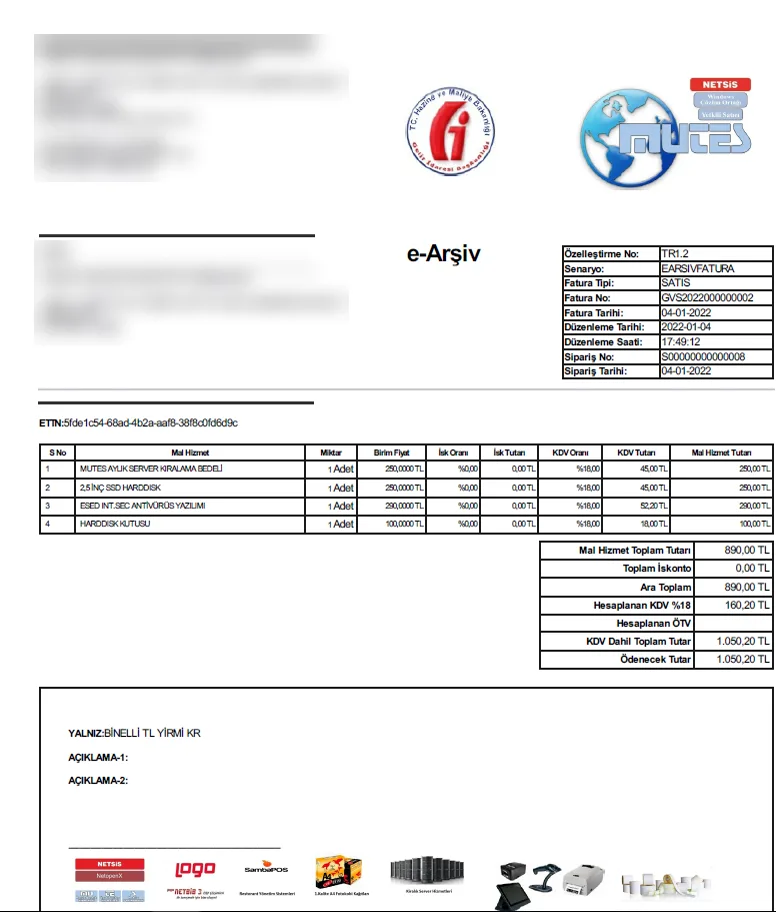
An e-Arşiv (e-archive) invoice is the electronic invoice issued to buyers who are not registered e-Fatura users; e-Fatura is used between two registered users. In Netsis, e-Arşiv invoices are issued from your sales records and reported to GİB through the private integrator. Cancellations are also handled in Netsis. Mutes Yazılım Evi supports setup, parameters and daily use.
A paper invoice is issued in at least two copies: the original goes to the buyer, and the second copy stays with the issuer. With e-Arşiv, the invoice given to the buyer on paper or sent electronically counts as the original. The copy the issuer stores electronically counts as the second copy.
You issue e-Arşiv invoices to companies that are not registered in the e-Fatura system and to people who are not taxpayers, in other words consumers. If the buyer is an e-Fatura user, the same sale is invoiced as e-Fatura.
E-ARŞİV INVOICE · COPIES
Sales recordNetsis
e-Arşiv invoice
To the buyergiven on paper or sent electronicallyThe original
With the issuercopy stored electronicallyCounts as the second copy
Reported to GİB through the private integratorReported
DIFFERENCE
What is the difference between e-Fatura and e-Arşiv?
COMPARISON
e-Fatura
e-Arşiv invoice
Who receives it?
Buyers registered in the e-Fatura system
Companies not registered in the e-Fatura system, and consumers
How does it reach the buyer?
Through the integrator and GİB's system, to the buyer's e-Fatura address
Electronically or as a paper printout
What GİB sees
The invoice is transmitted through GİB's system
The invoice is reported to GİB; Netsis shows the status "Raporlandı" (Reported)
Incorrect invoice
In the commercial scenario (ticari senaryo), the buyer can send a rejection response
The invoice is canceled; Netsis creates a cancellation invoice
What decides the document type is whether the buyer is a registered e-Fatura user. Netsis reads this from the e-Fatura information on your customer account cards (cari kart). Menu names are shown as they appear in the Turkish interface, with an English translation in parentheses.Everything about e-Fatura
REGULATIONS
Who must issue e-Arşiv invoices?
e-Fatura users issue e-Arşiv invoices to buyers who are not registered in the e-Fatura system. Businesses that are not e-Fatura users also have e-Arşiv requirements. Because the scope and amount limits change from year to year, we give this information only in the box below.
The date we last checked the information is shown below the box. Before you decide, we recommend also reading the current text at the source link.
NETSIS OPERATIONS
How does e-Arşiv work in Netsis?
Menu and command names are shown as they appear in the Turkish interface of Netsis, with an English translation in parentheses.
Creating a cancellation invoice and undoing a cancellation
1Find the invoice in the e-Arşiv outbox under Lojistik–Satış › Fatura › Kayıt › E-Arşiv İşlemleri (Logistics–Sales › Invoice › Entry › e-Arşiv Operations).
2Right-click the invoice and choose E-Arşiv İptal Faturası Oluştur (Create e-Arşiv cancellation invoice).
3If you want to delete the invoice, delete it with Satış Faturası Sil (Delete sales invoice) after the document reaches "Raporlandı" (Reported) status at GİB. Stock and account movements are balanced; the deleted document number cannot be used again.
4If you change your mind, right-click the invoice and choose İptal işleminin geri alınması (Undo cancellation). This is possible only within the time the program allows.
How do you avoid issuing e-Arşiv to an e-Fatura user by mistake?
Netsis knows whether the buyer is an e-Fatura user from the customer account card. This information comes from GİB's list through the e-Fatura customer update. If the update is forgotten, a customer who has recently become an e-Fatura user may receive an e-Arşiv invoice. With Zamanlanmış Görevler (Scheduled Tasks), you can run the update automatically every day.
You can also prepare and send from Netsis the e-Arşiv invoices that must be issued through GİB's portal. For this:
Netsis must have a GİB e-Arşiv license,
the company's e-Arşiv settings must be defined in the e-Fatura settings program in the service folder,
GİB E-Arşiv Uygulaması Kullanılsın (Use GİB e-Arşiv application) must be selected in the e-Arşiv parameters. The setting works per company (işletme); one of your companies can use the GİB portal method while another uses regular e-Arşiv.
Your GİB portal user details are defined on the integrator side. When you send, an SMS verification code arrives on your registered mobile phone for each invoice. The GİB invoice number updates automatically when you query the outbox after the document reaches the portal.
Businesses providing charging services issue their e-Arşiv invoices with the "e-Arşiv Fatura" scenario and the "SARJ" or "SARJANLIK" invoice type. In Netsis, "Enerji Fatura Uygulaması" (Energy invoice application) is selected in the sales invoice parameters, and special parameters are defined for required fields such as license plate and vehicle ID number.
We set up e-Arşiv in your Netsis and define the document series, invoice design and e-Arşiv parameters. If you need to use the GİB portal method, we supply its license and make the settings. We automate the customer update and show your team the cancellation and undo steps. If you prefer, we file your e-Arşiv application on your behalf; if not, we help you during the application.
Afterwards, for questions about cancellation, reporting or document type, we provide phone, online and on-site support according to your support package. Ask us about the language of support and training when you request a quote.
We work with eLogo as private integrator. If, as an individual taxpayer, you will sign your e-documents with an e-signature, we also help you obtain it as an authorized TÜRKKEP sales point.
For current account reconciliation: Logo e-Mutabakat (not a GİB e-document)
Frequently asked questions
What is the difference between e-Fatura and e-Arşiv?+
e-Fatura is issued between two registered e-Fatura users and sent through GİB's system to the buyer's e-Fatura address. An e-Arşiv invoice is issued to companies that are not e-Fatura users and to consumers; it reaches the buyer electronically or as a paper printout and is reported to GİB. Which one you issue depends on whether the buyer is a registered e-Fatura user.
Can I issue an e-Arşiv invoice to an e-Fatura user?+
If the buyer is an e-Fatura user, the invoice must be issued as e-Fatura; the e-Arşiv invoice is for buyers who are not e-Fatura users. Any exceptions are listed in the regulation box. In Netsis, the way to prevent this mistake is to run the e-Fatura customer update regularly, preferably automatically every day.
What happens if I issue e-Arşiv instead of e-Fatura?+
For an invoice issued in the wrong type, penalties under the Tax Procedure Law (VUK) may apply. If the mistake is noticed early, the e-Arşiv invoice can be canceled and an e-Fatura issued for the same sale; the cancellation period is in the regulation box. For the cancellation steps in Netsis, see our e-Arşiv cancellation guide (in Turkish).
What happens if the e-Arşiv cancellation period has passed?+
After the cancellation period, an e-Arşiv invoice can no longer be withdrawn with a cancellation; corrections are made by other routes provided for in the regulations. The current cancellation period is in the regulation box. If you are not sure which document to issue, ask your accountant (mali müşavir) or our support team before you enter the record.
Last updated:
Let's plan your e-Arşiv setup together
Tell us which Netsis package you use and whom you invoice. We'll prepare a quote with the e-Arşiv and e-Fatura settings you need.
Monday–Saturday, 09:00–18:00 (Türkiye time, GMT+3) · Tepekule Mah. 2084/8 Sk. No:39/A, 35530 Bayraklı/İzmir, Türkiye
Your cookie choice
We use strictly necessary cookies to make mutes.com.tr work. We turn on analytics cookies (Google Analytics) and external content such as maps and videos only if you allow them. Details: Cookie Policy.