Skip to content
Monday–Saturday, 09:00–18:00 (Türkiye time, GMT+3) Phone: +90 533 281 23 20 satis@mutes.com.tr
E-INVOICING · E-FATURA

e-Fatura in 2026: Türkiye's e-Invoice Mandate and Logo Edge N-Series (Logo Netsis)

e-Fatura is Türkiye's e-invoice: an invoice issued as an electronic document to the standard of the Revenue Administration (GİB), sent, stored and presented electronically between registered e-Fatura users. GİB regulations decide who must switch, using criteria such as turnover; our regulation box gives current thresholds and dates. Mutes Yazılım Evi handles the switch, Netsis settings and daily support.

Who must use e-Fatura?
  • Netsis since 2004
  • Authorized Logo Netsis reseller
  • Logo Business Partner – Solution Development
  • Bayraklı, İzmir, Türkiye
Sample e-Fatura document issued from Logo Netsis
Through the private integratorto the buyer's e-Fatura address
Stored electronically
DEFINITION

What is e-Fatura?

e-Fatura is the electronic invoice that replaces the paper invoice. In Netsis, it is created from your sales invoice record and sent through your private integrator (özel entegratör, a GİB-authorized service provider) to the buyer's e-Fatura address. The invoice is stored electronically; you don't need to archive paper printouts.

e-Fatura is issued only between two registered e-Fatura users. If your buyer is not an e-Fatura user, you issue the invoice as an e-Arşiv (e-archive) invoice instead. For the differences between the two:

What is an e-Arşiv invoice?
E-FATURA FLOW
Sales invoice recordNetsis
Is the buyer an e-Fatura user?
Yes
Private integrator
Buyer's e-Fatura address
e-Fatura
No
e-Arşiv invoiceif the buyer is not an e-Fatura user
What is an e-Arşiv invoice? →
REGULATIONS

Who must use e-Fatura in 2026?

GİB regulations set the obligation to switch to e-Fatura. The criteria they use include annual turnover (gross sales revenue) and line of business. The turnover threshold, which year's turnover counts and the time allowed for the switch change from time to time, so we give this information only in the box below.

The date we last checked the information is shown below the box. Before you decide, we recommend also reading the current text at the source link.

Is there a separate rule for your sector?

Some lines of business have e-Fatura rules that apply regardless of turnover. For example, charging network operators and the charging station operators they certify must switch to e-Fatura; in Netsis, these invoices are issued with the "ENERJI" (energy) scenario. We keep the current situation for each sector in the regulation box.

SWITCHING

How do you switch to e-Fatura?

  1. 1. Check your obligation Review the information in the regulation box with your accountant (mali müşavir).
  2. 2. Get a financial seal or e-signature Legal entities use a financial seal (mali mühür); individuals use a financial seal or an e-signature (e-imza, a qualified electronic certificate). Your company obtains the financial seal itself. As an authorized TÜRKKEP sales point, we help you with the e-signature. TÜRKKEP e-Signature →
  3. 3. Private integrator and application We work with eLogo as private integrator. The application follows the application guides GİB publishes at ebelge.gib.gov.tr. If you prefer, we file the application on your behalf; if not, we help you during the application.
  4. We handle it
    4. Check your Netsis license and version The licenses needed for e-Fatura must be defined, and Netsis must be on the current version.
  5. We handle it
    5. Set up Netsis The e-Fatura parameters, document series (belge birim kodu), invoice design, seal settings and the e-Fatura customer update are defined.
  6. We handle it
    6. Test the first invoices Check the responses in the outbox, then move to daily use.

We carry out steps 4, 5 and 6 for you. Our e-invoicing overview describes the whole switch, including who does which step.

How to switch to e-Dönüşüm in Netsis
NETSIS SETTINGS

Which Netsis settings make e-Fatura easier?

e-Fatura customer update

Copies GİB's list of registered e-Fatura users to the customer account cards (cari kart) in Netsis. It can run automatically every day with Zamanlanmış Görevler (Scheduled Tasks). This reduces the risk of issuing an e-Arşiv invoice by mistake to a customer who is an e-Fatura user.

Export invoices

In packages with the license, export invoices are also issued as e-Fatura.

e-İrsaliye

Turned on from the same E-Fatura Parametreleri (e-Invoice Parameters) screen.

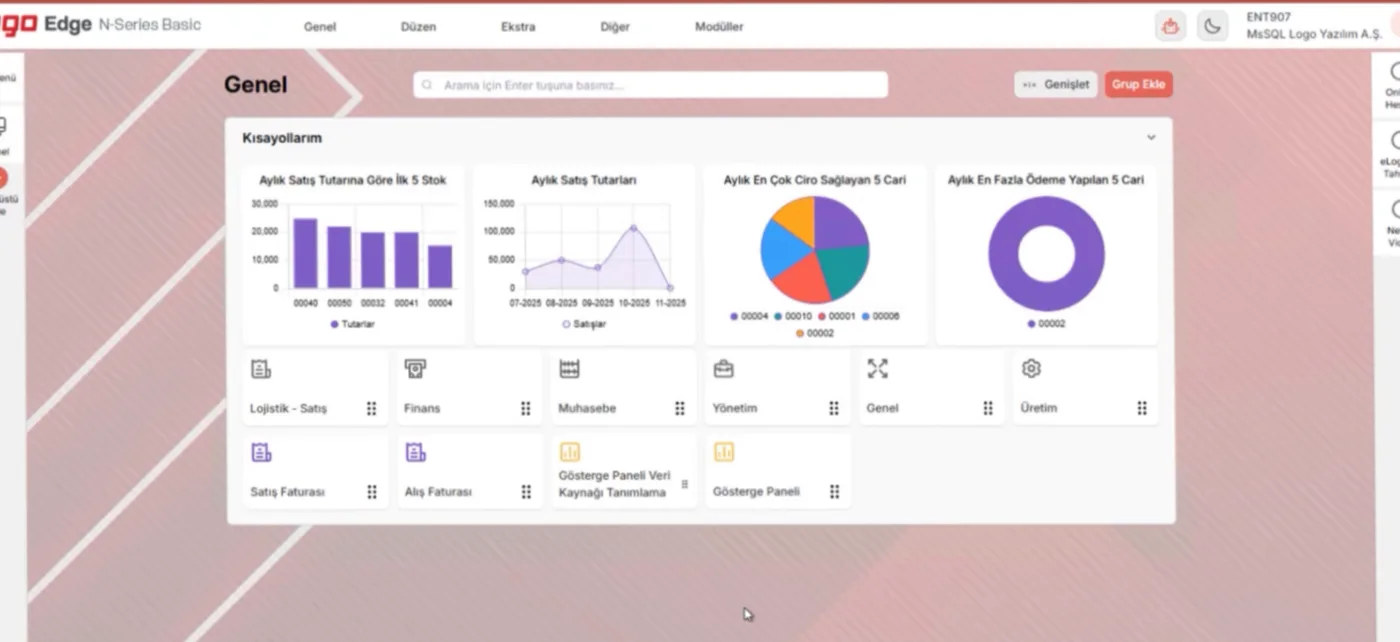
Logo Edge N-Series Basic home screen
Logo Edge N-Series Basic home screen · Image: Logo Yazılım
WITH MUTES

What does Mutes do for your e-Fatura?

As an Authorized Logo Netsis reseller, we supply the Netsis licenses needed for e-Fatura and handle installation and settings. We prepare your invoice design, automate the e-Fatura customer update and issue the first invoices with you.

After the switch, if your team gets stuck on a rejected invoice, a wrong series or a status code it doesn't understand, we provide phone, online or on-site support according to your support package. User training is 50% off with the Standard support package and free with the Comprehensive package. Ask us about the language of support and training when you request a quote.

We work with eLogo as private integrator; we set up the connection between Netsis and eLogo during installation.

See our support packages Request a quote for your e-Fatura switch →

Other e-documents

e-Arşiv → e-İrsaliye → e-Defter → Export e-invoice →

For current account reconciliation: Logo e-Mutabakat (not a GİB e-document)

Frequently asked questions

What is e-Fatura?

e-Fatura is the issuing of an invoice as an electronic document to the standard set by GİB, and its sending, storage and presentation in electronic form. It is used only between registered e-Fatura users; if the buyer is not an e-Fatura user, an e-Arşiv invoice is issued. In Netsis, e-Fatura is created from the sales invoice record and sent through the private integrator.

Who must use e-Fatura in 2026?

GİB regulations set the obligation. The criteria include exceeding a certain turnover and working in one of the lines of business brought into scope. The current turnover threshold, the sectors in scope and the switch dates are in the regulation box on this page, with the source and last-checked date. For a final assessment, we recommend reviewing it with your accountant (mali müşavir).

What is the turnover threshold for switching to e-Fatura?

The turnover threshold is reached when gross sales revenue in a fiscal period exceeds the amount set by GİB; taxpayers who exceed it must switch to e-Fatura within a set period. Because the amount, the period it is based on and the time allowed for the switch can change through regulations, we give current values only in the regulation box.

How do you switch to e-Fatura, and how do you apply?

First, your obligation and switch date are clarified. Then legal entities get a financial seal (mali mühür), individuals a financial seal or an e-signature, and the application is made according to GİB's application guides; documents are sent through a private integrator. If you prefer, we file the application on your behalf, or we help you with it. After the application, your accounting program is prepared for e-Fatura. In Netsis, Mutes Yazılım Evi handles the license check, parameters, series, design and customer update; we work with eLogo as private integrator.

What happens if I don't switch to e-Fatura? What is the penalty?

Issuing a paper invoice instead of e-Fatura, or issuing no invoice, when e-Fatura is mandatory leads to the special irregularity penalty (özel usulsüzlük cezası) in Article 353 of the Tax Procedure Law (VUK). The type of penalty and how it is calculated are in the regulation box. To avoid missing your switch date, we recommend starting preparations early.

How do I know whether I'm an e-Fatura user?

If your tax ID number is on GİB's list of registered e-Fatura users, you are an e-Fatura user. Whether you are required to be one is a separate question, answered by the turnover and line-of-business criteria (regulation box). The e-Fatura customer update in Netsis copies the same list to your customer account cards, so you can see whether your customers are e-Fatura users.

How many days do I have to reject an e-Fatura, and how do I reject it?

The buyer of an e-Fatura sent in the commercial invoice scenario (ticari senaryo) can answer it with an acceptance or rejection response within the period set by the regulations. In the basic invoice scenario (temel senaryo), this response is not given; objections are made by other means. The current rejection period is in the regulation box. In Netsis, you follow the responses to incoming and outgoing invoices on the e-Fatura screens; if you get stuck, contact our support team.

Last updated:

Let's plan your e-Fatura switch together

Tell us which Netsis package you use and when you need to switch to e-Fatura. We'll prepare a quote covering the licenses, settings and training on the Netsis side.

Monday–Saturday, 09:00–18:00 (Türkiye time, GMT+3) · Tepekule Mah. 2084/8 Sk. No:39/A, 35530 Bayraklı/İzmir, Türkiye

Choose which cookie categories you allow. You can change your choice at any time with the "Cookie settings" link at the bottom of the page.

Strictly necessary cookies Needed for the site to work securely and to remember your choice.
Always on
Analytics (Google Analytics) Helps us measure how the site is used. If you do not consent, Google Analytics is not loaded at all.
External content (YouTube, Google Maps) Embedded videos and maps load from third-party servers and may use cookies. While this is off, you can still load each item with one click.
Open in a new tab (opens in a new tab)